Qwen-Image 2.1 on a 6GB GPU: Same Chinese Text, Different Prompt, 1/6 vs 6/6 Correct
With INT8 weights and CPU offload, all 17 generations succeeded on an RTX 3060 Laptop 6GB, at about 3 minutes per 1024×1024 image. With identical target text, a bare prompt rendered it strictly correct 1/6 times; a prompt spelling out lines and boundaries, 6/6.
Results
- It runs: 17 generations, 0 failures. At 1024×1024 and 25 steps, five repeats of one config took 185.61 s per workflow (SD 3.06).
- VRAM: 4931–4963 MiB whole-GPU peak.
- Text: the prompt mattered more than the model.
- Bare prompt (A): strictly correct 1/6.
- Prompt that specifies each line, its position and "no extra text" (B): 6/6.
- B met its layout requirements only 4/6 times. Correct text doesn't mean the layout is right.
Setup
- Hardware: RTX 3060 Laptop 6GB, i7-12700H, 64GB RAM.
- Software: ComfyUI v0.37.0, PyTorch 2.14.0+cu130.
- Weights: official Comfy-Org/Qwen-Image-2.1 repo. The diffusion model and Qwen3-VL text encoder are INT8 convrot; the VAE runs on the CPU.
- Sampling: 1024×1024, 25 steps, CFG 1.0, Euler/simple, seeds 42, 1234 and 2026.
This combination fits in 6GB; that says nothing about the full BF16 stack.
Two prompts
A short poster with two lines of target text (Chinese title and subtitle).
- A just says: make a simple Chinese poster, title: …, subtitle: ….
- B says: only these two text blocks appear, copied exactly. The quotes only mark boundaries, so don't draw them or the field names. Line 1 is centered at the top in a larger size, line 2 directly below in a smaller size. Keep the case of "6GB" and "Qwen Image" and the Chinese punctuation.
Results by scene
| Scene | A strict pass | B strict pass |
|---|---|---|
| Poster (2 lines) | 1/3 | 3/3 |
| Info card (5 lines, 79 chars) | 0/3 | 3/3 |
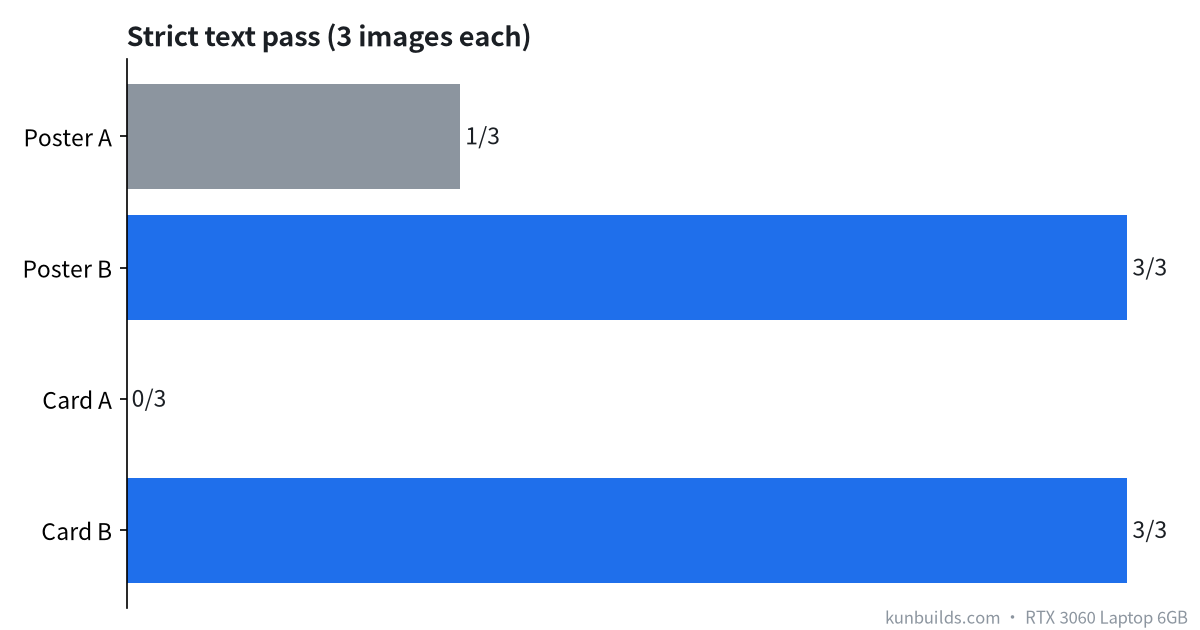
A failed in two ways:
- On posters it added extra text (two images had extra text).
- On the card it dropped characters: 4, 4 and 3 missing across the three images, plus one wrong character.
B had no wrong or missing characters, but two posters missed their layout requirements.
B changed several things at once (quote boundaries, line order, position, size, no extra text), so we can't credit any single change, only the prompt as a whole. The sample is small, so don't expect zero garbled text from now on.
Practical tips
- Write each line separately and give its position.
- Say explicitly "only this text" and "don't draw field names".
- Check the output character by character. One correct render doesn't mean the next will be.
Related
- Same model, poetry posters: 8 of 16 fail on text
- Faster model downloads
- What runs on 6GB VRAM