MoE in llama.cpp: Putting All Experts on the CPU Was 4x Faster (-ncmoe Tuning)
On a 6GB laptop, Qwen3.6-35B-A3B generates 5.2 t/s with experts on the GPU and 21.5 t/s with all experts in system RAM, using half the VRAM. That isn't a rule, though. LFM2.5-24B peaks in the middle.
Video
In one line
-ngl 99 puts every layer on the GPU. -ncmoe N (--n-cpu-moe) then moves the expert weights of the first N layers back to system RAM. With little VRAM and plenty of RAM, start with all experts in RAM and work back.
35B: the more on the CPU, the faster
Qwen3.6-35B-A3B UD-Q4_K_XL, RTX 3060 Laptop 6GB + 64GB DDR5, llama.cpp 9655061, llama-bench -ngl 99 -p 512 -n 128 -r 5:
| -ncmoe | pp512 (t/s) | tg128 (t/s) | VRAM peak |
|---|---|---|---|
| 0 | 79.46 | 5.16 | 5940 MiB |
| 10 | 81.33 | 6.66 | 5962 MiB |
| 20 | 75.38 | 9.32 | 5972 MiB |
| 30 | 94.79 | 16.27 | 5978 MiB |
| 40 | 302.83 | 21.49 | 2860 MiB |
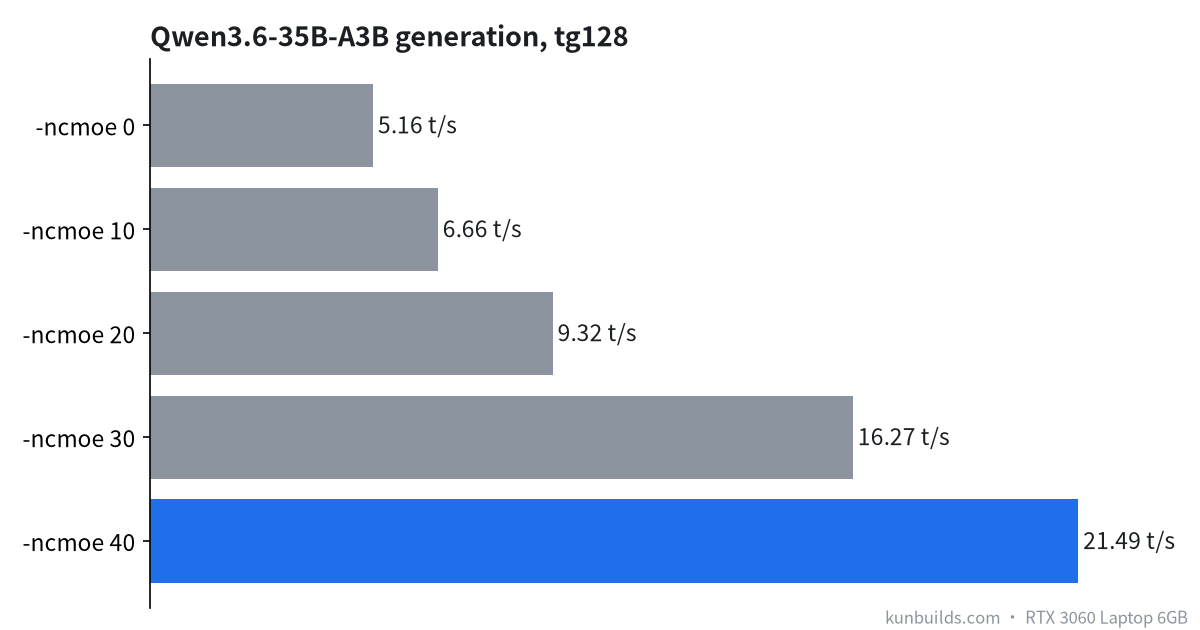
With experts on the GPU, 20+ GB of weights can't fit in 6GB, so much of it is read over PCIe and every token waits. With all experts in RAM, the GPU only handles attention, routing and the KV cache, which runs cleanly.
Don't split -ngl halfway either. With -ncmoe 40, -ngl 10 generates 8.50 t/s, -ngl 0 8.85 and -ngl 99 22.92.
24B: the sweet spot is in the middle
LFM2.5-24B-A2B Q4_0, same machine:
| -ncmoe | pp512 | tg128 | VRAM (real-task peak) |
|---|---|---|---|
| 40 | 139.88 | 22.49 | 1299 MiB |
| 30 | 180.70 | 29.47 | 4535 MiB |
| 20 | 85.95 | 29.49 | — |
The model is smaller, so some experts fit in VRAM and 30 beats 40. At 20, prompt processing drops by more than half. There's no universal answer: start with everything in RAM, step down by 10, watch VRAM and speed, then refine around the turning point.
KV cache quantization
At 16K context, switching the KV cache from f16 to q8_0 saves 492 MiB, and q4_0 saves 574 MiB, with speed differences within noise. Once the experts are in RAM, that VRAM doesn't buy speed. It only helps if you plan to move more experts back onto the GPU.
RAM
The 35B setup peaks at about 23.8 GiB of system RAM, mostly page cache. That's the price of keeping experts in RAM: fine on 64GB, not realistic on 16GB.
Related
FAQ
What -ncmoe value should I use? Start with all experts on CPU and step down by 10. Our 35B was fastest at 40, the 24B at 30.